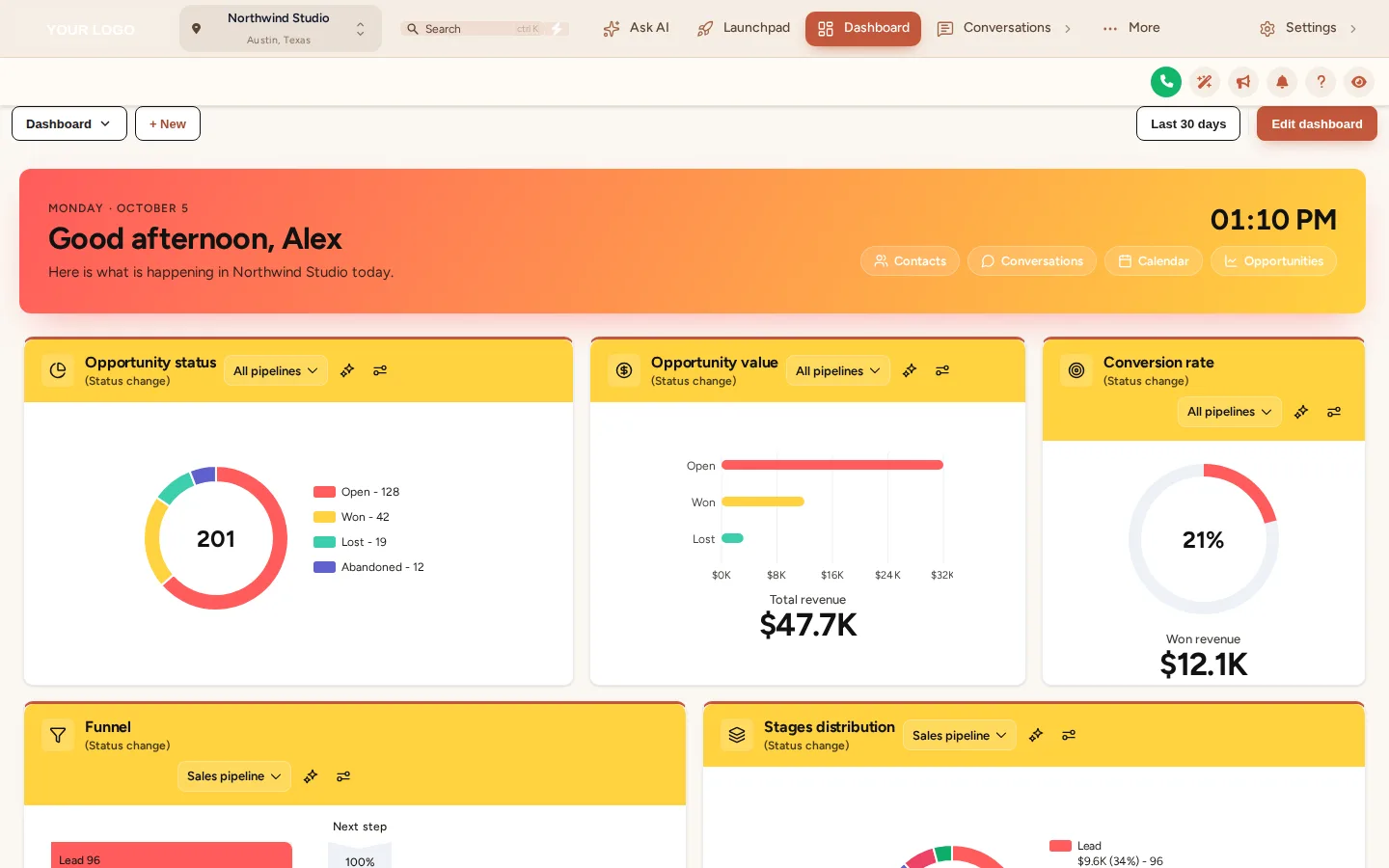
A morning check-in screen
A greeting with the client’s name, today’s date and the quick links they actually use, so the account feels like their workspace, not a vendor login.
Module 01 · Dashboards
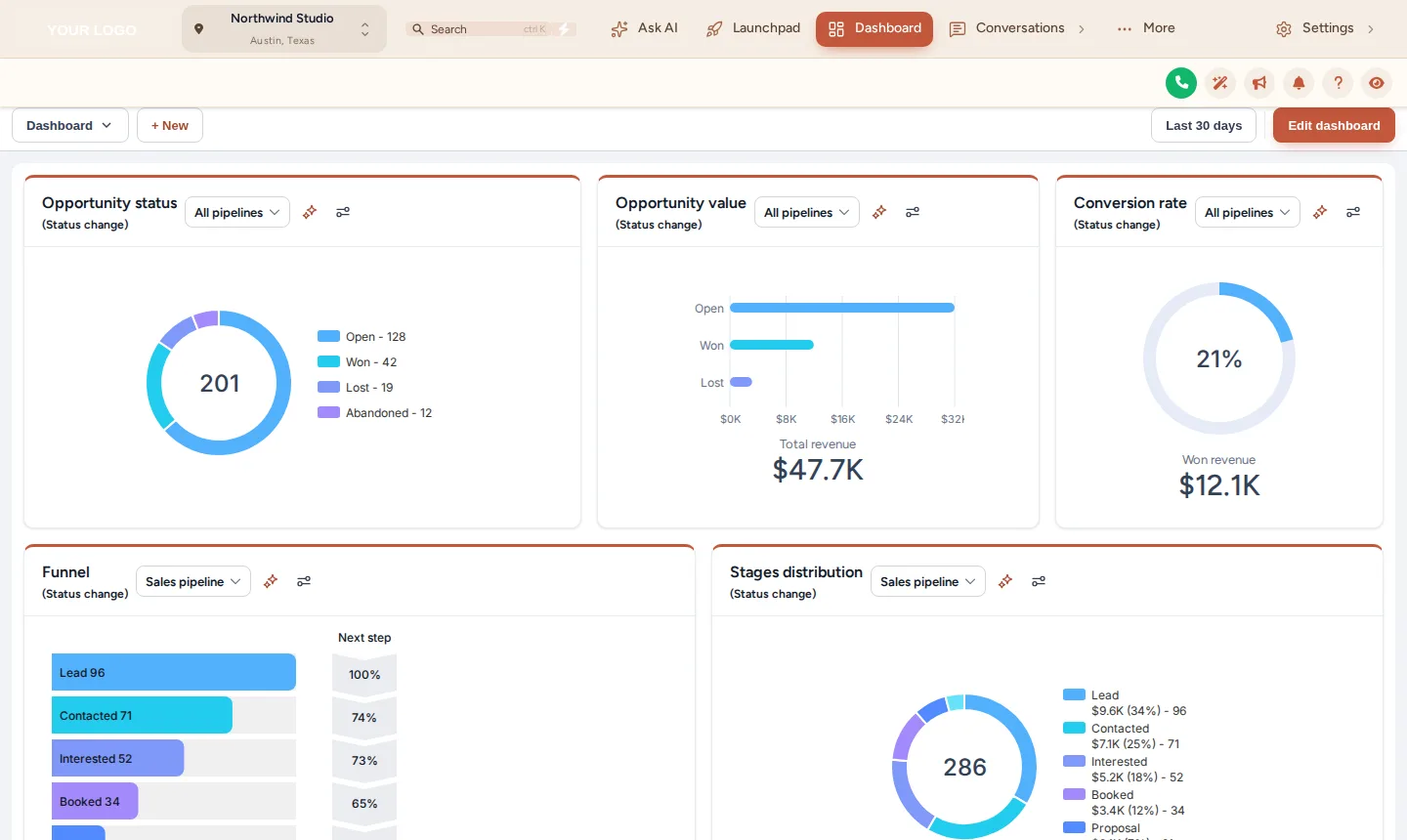
A GHL custom dashboard replaces the stock GoHighLevel home screen with one of 18 designs, restyled in your colours: greeting banner, live clock, quick links and chart colours that match your brand. It is the first screen a client sees after logging in, so it is the one that decides whether your platform looks bought or built.
In Brand Pro and Brand Total · one-time payment, lifetime access · login emailed within minutes (max 24 hours)
Short answer
It is a restyled version of the GoHighLevel sub-account dashboard. The customizer applies one of 18 designs to the real dashboard widgets, adding a branded greeting banner, quick links and matching chart colours. Your data stays exactly where GoHighLevel keeps it.
The default dashboard is the screen every reseller shares, and a client who has seen another agency’s account recognises it instantly. This module is how a white-label GHL customizer account removes it.
Fact sheet
Counts from the customizer catalogue · checked 2026-10-05
Problem → outcome
TodayA new client logs in and sees the same grey dashboard as every other GoHighLevel reseller.
With the accountThey land on a dashboard in your colours, with a greeting and quick links you chose.
TodayYour onboarding call starts with “ignore how this looks, it’s just the software”.
With the accountThe first screen does the selling, and the call starts on results instead of apologies.
TodayChart colours fight your brand palette in every screenshot you send.
With the accountCharts pick up the design’s colours, so reports and screen-shares look consistent.
Screenshots
Our own captures of the templates in this module, on sample data.
Agency use cases
A greeting with the client’s name, today’s date and the quick links they actually use, so the account feels like their workspace, not a vendor login.
Pitch new clients on a dashboard that looks like your product. Pair it with privacy mode and names blur while you present.
The design applies agency-wide, so a client with five locations sees the same branded home screen in each.
Setting it up
Inside your customizer account, after the login email arrives. No code beyond the install line you paste once.
In your customizer account, open Dashboards and browse the designs by light, dark or photo style.
Each design renders on a copy of the GoHighLevel dashboard with sample numbers, so you see the real layout before it goes live.
Choose which links sit in the banner and let the design follow your brand colours, or keep its own palette.
Save. If the install line is already in GoHighLevel, the new dashboard is live on the next page load.
Not installed yet? The two-minute install guide shows exactly where the line goes.
Which package
It is in Brand Pro and Brand Total. Brand Lite covers themes, layout, dark mode and login pages only.
L01Tier 1
Your colours, your logo and your login page across every screen your client opens.
$237one-time · USD
Login emailed within minutes (max 24 hours)
L02Tier 2Most agencies
Brand Lite plus your own navigation, dashboard, pipeline board and contact actions.
$567one-time · USD
Login emailed within minutes (max 24 hours)
L03Tier 3
Brand Pro plus popups, notifications, calculators, floating widgets and an editor in your own name.
$1,167one-time · USD
Login emailed within minutes (max 24 hours)
One-time payment, lifetime access. No subscription, no monthly fee. You customize and install it yourself; nothing is designed or installed for you. All sales are final once the account has been created.
Questions
Same account
Themes and dark mode
GoHighLevel’s own sidebar and card styling is the single most recognisable trace of the platform underneath your brand.
27 complete themes →
Opportunities boards
The opportunities board is where a client’s sales team spends its day, and the stock kanban is unmistakably the platform’s.
12 board designs →
Menus and navigation
The default left sidebar, with its familiar icons in their familiar order, is the first thing a GoHighLevel user spots.
8 mega-menu styles →
Installing a fresh account for a client? The customizer restyles whatever is inside it, including our rebrandable white-label snapshots, so a snapshot install and a branded interface can land together.
GHL Customizer account
Brand Pro is $567 once. Login emailed within minutes (max 24 hours); you customize it in the live editor and paste one line into GoHighLevel.
Accessibility
Text size
Reduce motion switches off the WebGL dashboard, the particle field and every autoplaying element.