Sales-heavy clients
Clients whose teams work deals all day get a board that is easier to scan and nicer to live in.
Module 03 · Opportunities
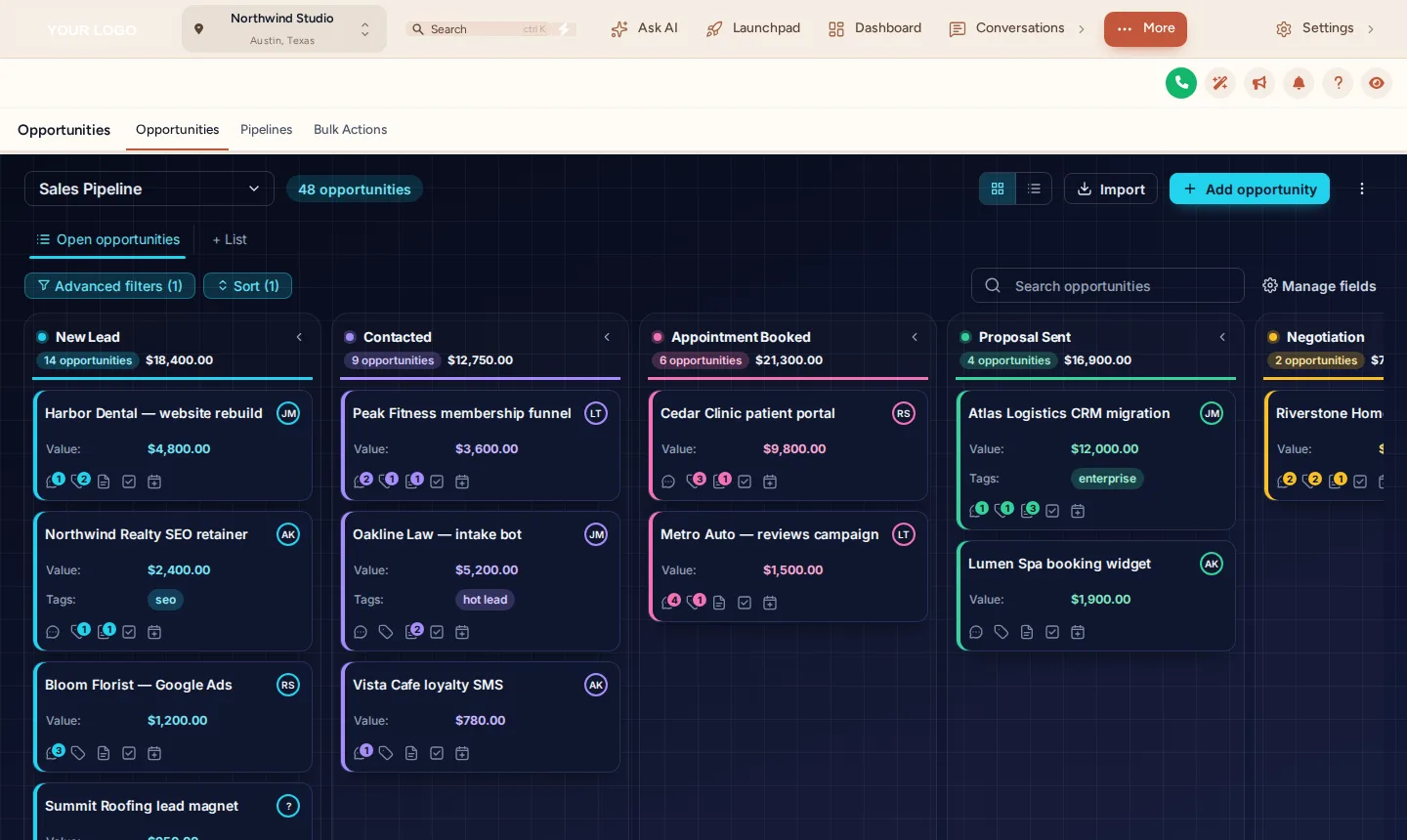
GoHighLevel pipeline board designs restyle the opportunities board, the kanban view clients and sales teams stare at all day. The customizer has 12 board designs, light and dark, with stage colours that follow each column’s position, so they fit any sales process whatever the stages are called. It is the CRM screen that most needs to look like your own software.
In Brand Pro and Brand Total · one-time payment, lifetime access · login emailed within minutes (max 24 hours)
Short answer
Yes. The customizer restyles the opportunities board with one of 12 designs: column backgrounds, card styling and stage colours. It is applied by your install line and keeps every board function working.
The opportunities board is where a client’s sales team spends its day, and the stock kanban is unmistakably the platform’s. This module is how a white-label GHL customizer account removes it.
Fact sheet
Counts from the customizer catalogue · checked 2026-10-05
Problem → outcome
TodayYour client’s sales team lives on the opportunities board, and it is the plainest screen in the app.
With the accountThe board carries a deliberate design: stage colours, card styling and a background that match your brand.
TodayEvery pipeline you build for a different client looks identical.
With the accountStage colours follow position, so each client’s own stages light up without extra setup.
TodayDark-mode users get a dark sidebar next to a glaring white board.
With the accountDark board designs keep the whole sales screen consistent at night.
Try it live
This is the real customizer engine in a sandbox. Every option below is a template your account includes.
Agency use cases
Clients whose teams work deals all day get a board that is easier to scan and nicer to live in.
Weekly pipeline calls on a board in your brand look like a reporting product, not a back office.
Pair it with a white-label snapshot: the pipelines you install arrive on a board that already looks like yours.
Screenshots
Our own captures of the templates in this module, on sample data.
Setting it up
Inside your customizer account, after the login email arrives. No code beyond the install line you paste once.
Choose Opportunities in the editor and browse the designs on a sample sales pipeline.
The sample shows how stage colours fall by position, which is how they will fall on your clients’ boards.
Combine the board with your theme, or pick a dark board for a dark sidebar.
Save; the board restyles on the next load wherever your install line runs.
Not installed yet? The two-minute install guide shows exactly where the line goes.
Which package
It is in Brand Pro and Brand Total. Brand Lite covers themes, layout, dark mode and login pages only.
L01Tier 1
Your colours, your logo and your login page across every screen your client opens.
$237one-time · USD
Login emailed within minutes (max 24 hours)
L02Tier 2Most agencies
Brand Lite plus your own navigation, dashboard, pipeline board and contact actions.
$567one-time · USD
Login emailed within minutes (max 24 hours)
L03Tier 3
Brand Pro plus popups, notifications, calculators, floating widgets and an editor in your own name.
$1,167one-time · USD
Login emailed within minutes (max 24 hours)
One-time payment, lifetime access. No subscription, no monthly fee. You customize and install it yourself; nothing is designed or installed for you. All sales are final once the account has been created.
Questions
Same account
Dashboard designs
The default dashboard is the screen every reseller shares, and a client who has seen another agency’s account recognises it instantly.
18 dashboard designs →
Contact actions bar
Without it, every routine job on a contact is the platform’s own sequence of menus and modals.
6 bar positions →
Themes and dark mode
GoHighLevel’s own sidebar and card styling is the single most recognisable trace of the platform underneath your brand.
27 complete themes →
Installing a fresh account for a client? The customizer restyles whatever is inside it, including our rebrandable white-label snapshots, so a snapshot install and a branded interface can land together.
GHL Customizer account
Brand Pro is $567 once. Login emailed within minutes (max 24 hours); you customize it in the live editor and paste one line into GoHighLevel.
Accessibility
Text size
Reduce motion switches off the WebGL dashboard, the particle field and every autoplaying element.